You've got a half-written caption, a video waiting to be edited, and a calendar that says something should go live today. Meanwhile, someone has asked a useful question in the comments, but you're too busy preparing the next post to answer it.
It's like running a restaurant where the chef also takes reservations, orders ingredients, and carries every plate to the table. The answer isn't to cook faster. You need a production system that connects creative work with the decisions around it.
Table of Contents
- What Social Media Management and Content Creation Mean
- How to Plan a Content Cycle in Six Steps
- Batching Content to Save Production Hours
- Adapting One Idea Across Platforms
- Measuring Which Content Earns Its Place
- Organizing Roles and Tools for Your Team
- Using Trends and AI Without Losing Trust
- Start Your First Batch This Week
What Social Media Management and Content Creation Mean
In a restaurant, creation is cooking each dish. Management is running the kitchen: choosing the menu, organizing preparation, and timing service so food reaches several dining rooms while it's still hot.
Social publishing works the same way. Social media management covers planning, scheduling, publishing, replying to comments, and reporting across accounts. Content creation covers generating ideas, writing, shooting, editing, and adapting material for each platform.
The kitchen analogy makes the distinction concrete.

Say a bakery creates a video showing why sourdough needs time to ferment. Creation produces the script, footage, and edit; management decides where it belongs, when it publishes, who answers questions, and what result would justify making another.
A production resource can help with a specific task. For example, LunaBloom AI offers a way to turn scripts into finished videos, but the person directing the content still needs to choose the lesson, check the result, and give it a purpose.
Connect the work before increasing the output
The audience is large enough to make coordination matter. DataReportal reported 5.66 billion active social media user identities worldwide in October 2025, equivalent to 68.7% of the global population.
Those identities aren't an exact count of unique people. Individuals can maintain several accounts, and platforms measure audiences differently.
A workable system has distinct layers:
- The operating cycle: Planning and batching determine what gets made and when.
- The output: Platform-fit formats determine how each idea reaches its intended audience.
- The feedback loop: Measurement, ownership, and trust checks determine what happens next.
Social media management and content creation fail when those layers disconnect. Strong creative work can sit unpublished, while a perfectly maintained calendar can distribute posts nobody needs.
Diagnostic check: No useful ideas suggests a creation gap. Finished assets stuck in folders suggest a management gap. Regular publishing without clear decisions suggests a feedback gap.
Identify the gap before adding another account or buying another tool. Otherwise, you may just make the existing problem harder to manage.
How to Plan a Content Cycle in Six Steps
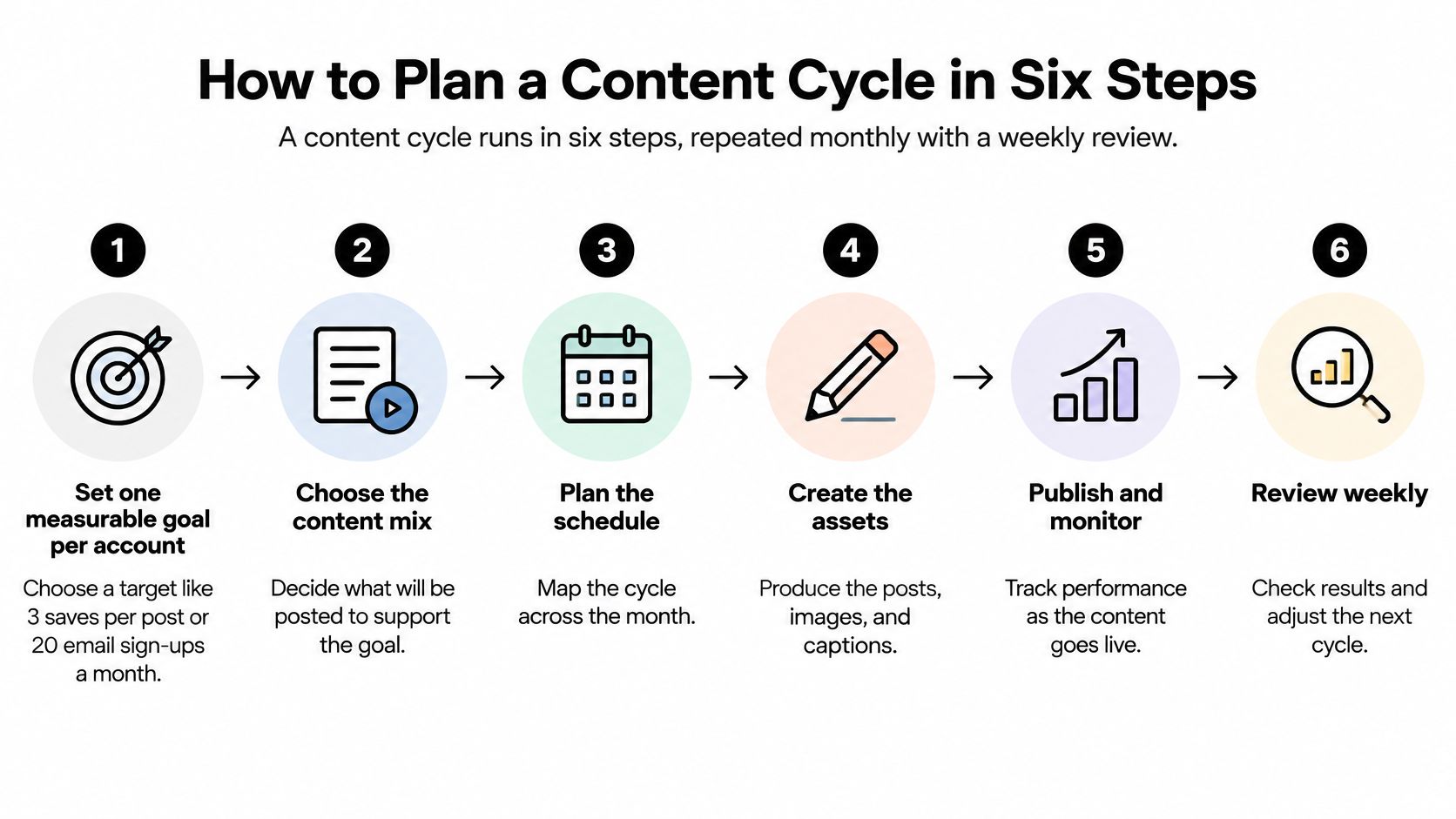
A content cycle runs in six steps, repeated monthly with a weekly review. The calendar isn't just a record of publishing dates; it's a set of decisions about audience needs, production capacity, and intended outcomes.
Start with a short planning document rather than a sprawling spreadsheet. Record the account's purpose, its audience, and the action you want people to take before filling any slots.
Use this process flow to keep the cycle visible.
Make the decisions in order
Set a measurable goal per account. Choose an outcome you can count, such as newsletter subscriptions from a teaching account or qualified enquiries from a service business. Set a target against your own baseline; the common mistake is choosing engagement without defining which action matters.
Choose a manageable set of content pillars. Teaching, behind-the-scenes work, proof, and offers can give a small business a useful starting mix. A pillar is a recurring audience need, not a format, so video isn't a pillar and an oversized topic list isn't a strategy.
Give each pillar a platform and audience. A practical demonstration might belong on a visual channel, while an explanation of the business decision behind it might suit a professional network. Don't force every pillar onto every account just because you can publish there.
Build recurring calendar slots with room for exceptions. Assign predictable spaces to your pillars and leave some uncommitted for timely questions or developments. Filling every available slot creates a calendar that breaks as soon as something unexpected happens.
Write a core idea and list its required versions. A slot should describe the useful point, the audience, and the intended action before anyone opens a camera or design tool. The usual slip is writing a topic such as customer service without specifying what the audience will learn.
Review the cycle weekly. Compare planned work with published work, then examine whether the posts prompted the intended response. Use that review to adjust the next cycle rather than rebuilding the plan after every disappointing post.
Separate discovery from depth
Add a purpose label to each calendar entry: distribution or protected. Distribution posts help unfamiliar people understand why they should pay attention; protected posts preserve expertise, nuance, or original thinking that shouldn't be shortened merely to resemble a popular format.
For a bakery, a satisfying dough-shaping clip might serve discovery. A careful explanation of fermentation failures might serve existing customers who want to improve their baking.
Both belong in the plan, but they don't need identical creative instructions. Give the discovery clip a clear visual opening; give the deeper explanation enough space to be useful.
The content planning process can help you turn these decisions into a repeatable calendar. Keep the working document simple enough that you can update it during an ordinary workday.
The final test is traceability: can you connect every planned post to an audience need, a pillar, and an intended outcome? If not, clarify the idea before producing it.
Batching Content to Save Production Hours
Small teams often lose attention by repeatedly switching between writing, filming, editing, and uploading. Batching means grouping similar production tasks, like preparing several meals while the ingredients and equipment are already out.
The need is familiar: in 2025, 54% of surveyed U.S. small and medium-sized businesses struggled to keep online content fresh and stay current with social media trends, according to Verizon's State of Small Business Survey of 600 businesses.
Prepare the workspace before you begin, so the session doesn't become a hunt for cables, files, or missing notes.

Follow the production tasks, not individual posts
Say a solo coach needs a collection of exercise demonstrations. Finishing each post from script to upload before starting the next would require repeated changes of equipment and attention.
Instead, the coach can work through a shared production sequence:
- Draft the ideas and hooks together: Check that each demonstration answers a different question.
- Write the platform captions while the ideas are fresh: Note any explanation that belongs in text rather than on camera.
- Shoot in a prepared location: Keep lighting, microphone placement, and background consistent.
- Edit with reusable templates: Apply caption styling and visual treatments together, then inspect each export.
- Load approved assets into the scheduler: Match files to captions and check the publishing preview.
Save a clean master file as well as the platform exports. Use descriptive filenames that identify the topic and version, rather than leaving the scheduler to choose among files named final and final-new.
If editing is the recurring bottleneck, Moonb's overview of video editing services can help you assess outside support. Prepare a brief with reference footage, caption styling, delivery formats, and approval requirements before handing anything over.
This video offers another way to examine a batching workflow.
Keep the batch small enough to change
Batching works well for planned demonstrations, explanations, and evergreen material. It doesn't replace live coverage, timely replies, or judgement about whether a scheduled post still fits the moment.
Start with a batch you can comfortably finish and review. Extend the publishing horizon only when your routine holds, and inspect queued posts when circumstances change.
The content batching guide provides a useful framework for organizing the work. A completed batch should leave you with approved assets and breathing room, not an enormous backlog of unfinished edits.
Adapting One Idea Across Platforms
One core idea should produce several native versions, each shaped by how people read on that platform. The lesson stays the same. What changes is the entry point: the first line, the format, the way the value appears before anyone commits a second of attention.
A useful way to think about this is a deliberate split. The insight, the evidence, and the original media are protected from optimization: they carry over intact. The packaging is open to optimization: the hook, the aspect ratio, the opening seconds, the call to action. A DataReportal global digital overview found that the average active social media user visited 6.7 different social platforms each month, so the same person may meet your idea in more than one place. If every version looks identical, repeat exposure feels like noise. If every version tells a different story, the repetition never accumulates into recognition.
Match the format to the reading environment
Platform formats and adaptation notes
| Platform | Visual format | Adaptation note |
|---|---|---|
| Instagram feed | Portrait or square image, carousel | Put the hook in the first line, before the caption expands. |
| Instagram Reels | Full-height vertical video | Build the hook into the opening moments on screen. |
| TikTok | Full-height vertical video | Avoid visible watermarks from other apps. |
| YouTube Shorts | 9:16 vertical video | Write a title that works without the video. |
| Text post, document carousel, image, or video | Lead with a framework or a result; avoid hashtag stacks. | |
| X (Twitter) | 16:9 video or 1:1 image, text post | Compress the idea to one claim and one link. |
| Threads | 4:5 or 1:1 image, or text post | Write conversationally and invite replies. |
| Tall portrait image or infographic | Use keyword-rich titles that match search intent. | |
| Bluesky | Image or text post | Keep it short and link-led, with context in the first line. |
Treat these formats as production choices rather than a guarantee of performance. A platform-aware draft should also specify where the link goes. Copying a caption that tells people to click below into a placement where the destination isn't clickable produces a post that asks for an action nobody can complete.
Adapt the lesson, not just the file
Say a consultant records an explainer about onboarding mistakes. For Reels or TikTok, the editor could open with a demonstration of the mistake, then show the correction. The lesson hasn't changed. Only the door into it has.
For YouTube Shorts, the title should identify the problem without relying on the thumbnail or opening frame. On LinkedIn, the same lesson could become a framework explaining what a manager should check before a new employee starts. On X, it might become a concise claim supported by a link to the full explanation. A Pinterest version could turn the process into a checklist someone can find through search.
Notice what stayed fixed across all five versions: the mistakes, the corrections, the consultant's method. What moved was the angle of approach. A written content repurposing strategy helps the team agree on which parts of a piece are protected and which parts get rebuilt per platform, so nobody has to relitigate the decision on every post.
Before approval, run a practical adaptation check:
- Inspect the crop: Keep faces, demonstrations, and on-screen text inside the visible frame.
- Confirm the text fits: Check captions, titles, and any separate link fields.
- Rewrite the opening: Make the value clear in the platform's normal reading pattern.
- Review the destination: Ensure the call to action leads somewhere usable.
- Add accessibility support: Check subtitles and add meaningful alt text where supported.
Export clean files rather than recycling downloaded posts, since platform watermarks signal that the content was made for somewhere else. A poor crop or an unreadable overlay can make a sound idea look careless, and careless packaging is the one adaptation failure the checklist above will catch every time.
Measuring Which Content Earns Its Place
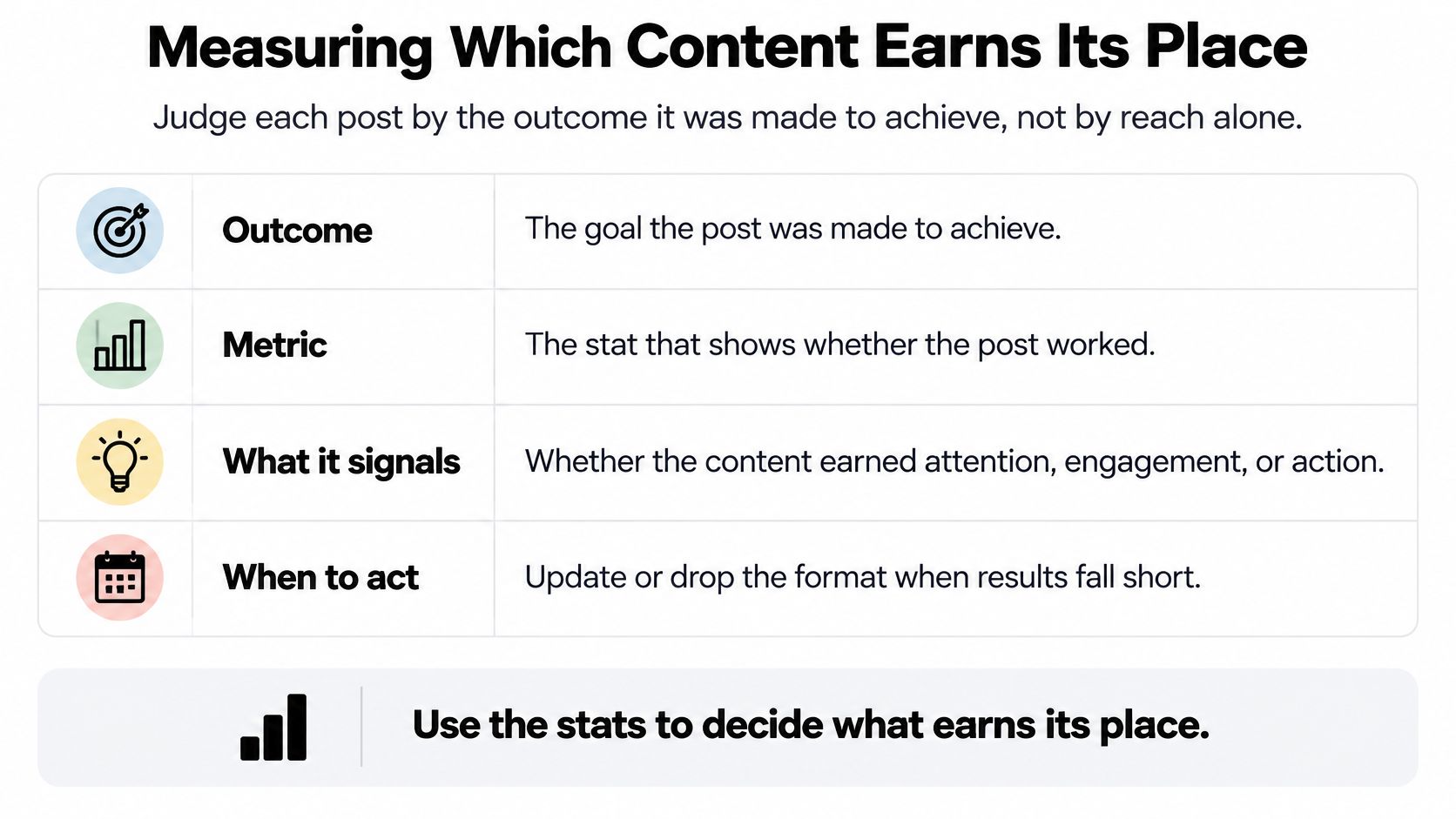
Judge each post by the outcome it was made to achieve, not by reach alone. A discovery clip and an in-depth explanation have different jobs, so a shared leaderboard can lead you to make the wrong decisions.
A 2025 survey of 1,000 creators, reported by TechCrunch, found that 78% said the algorithm affects what they create, while 56% said it had discouraged them from exploring their passions.
Match the metric to the decision
Content metrics, what they signal and when to act
| Metric | What it signals | Act when |
|---|---|---|
| Saves | Content worth returning to | Saves rise on a format: turn it into a repeating series. |
| Shares and reposts | Content people want to pass on | Shares are high but reach is low: test wider distribution. |
| Replies and comments | Conversation and trust | Replies show misunderstanding: clarify the next post. |
| Profile visits | Interest in you, not just the post | Visits are high but follows are low: review the bio and pinned post. |
| Click-through rate | Interest in the link | Clicks are low: rewrite the context before the link. |
| Email sign-ups or conversions | Business outcome | Sign-ups are flat across pillars: examine the offer and call to action. |
| Returning viewers | Audience loyalty | Returning viewers grow: retain the pillar and add a clear next step. |
| Reach and impressions | Distribution only | Reach rises without other signals: don't judge on reach alone. |
These signals require interpretation. A comment can express trust, disagreement, or confusion; a click can indicate curiosity without purchase intent.
Keep a short qualitative note beside the metrics. Record recurring questions, objections, and phrases that reveal what people understood.
This outcome framework keeps the distinction visible during review.
Protect the purpose, not weak execution
Protected content still needs evaluation. Protect its depth and original intent from reach-driven simplification, but don't protect inaccurate claims, confusing explanations, or poor presentation.
A useful explanation can deserve another attempt without being shortened into a different idea.
Choose a primary goal metric for each pillar and examine patterns across comparable posts. Compare similar formats, audiences, and publishing conditions rather than treating an isolated result as a verdict.
For small accounts, the evidence may remain thin. Inspect individual responses and show the underlying results alongside averages so an unusually successful post doesn't conceal ordinary performance.
Use tagged destination links and check completed sign-ups or purchases where possible. A platform click count isn't proof that someone reached the intended outcome.
The performance tracking guide can help organize that review. Finish with a decision: what earned the intended outcome, and which ideas deserve protected space in the next cycle?
Organizing Roles and Tools for Your Team
A solo creator carries every role, but a small team can separate responsibilities. The point isn't to create more job titles; it's to make sure unfinished work always has a named owner.
Someone must also have authority to stop publication. A designer noticing an unsupported claim needs a clear route to the approver, not a request to fix it in the layout.
Make the handoffs explicit
Content team roles and handoffs
| Role | Owns | Hands off to |
|---|---|---|
| Strategist or owner | Goals, pillars, and monthly calendar | Creator |
| Creator | Ideas, scripts, shooting, and first drafts | Editor or approver |
| Editor or designer | Cuts, visuals, and brand templates | Approver |
| Approver | Claims, names, numbers, sources, and brand tone | Scheduler |
| Community manager | Replies, messages, and escalations | Strategist, for recurring questions |
| Analyst | Weekly metrics and monthly test results | Strategist |
Use a clear status sequence: draft, review, approve, schedule, publish, and report. Assign an owner to each status, even when the same person owns several.
Approval should refer to a specific asset and caption version. If someone changes the claim after approval, return it for review rather than assuming the earlier sign-off still applies.
For agencies, agree on the client's response deadline and who can approve on their behalf. Keep sign-off records, and confirm whether your chosen tool supports the records and permissions you need.
Choose tools around the actual bottleneck
SleekPost is one option for central scheduling, per-platform copy and media customization, queues, recurring posts, and a shared media library; its AI Content Generator can also turn a link or prompt into a draft. A spreadsheet with native scheduling may be sufficient for a smaller operation.
Neither option replaces strategy or approval. Choose software by testing your real workflow, including a carousel, a video, a revised caption, and a post that must be withdrawn.
For teams connecting social publishing with merchandising and campaign work, Rapid Ads' guide to productivity software for ecommerce marketing teams can help identify coordination needs beyond the scheduler. Avoid adding a separate tool for every minor inconvenience.
The content approval process offers a starting point for defining responsibilities. Solo creators may not need formal sign-off, but they still benefit from separating drafting from a final accuracy check.
Handoff rule: Pass on the asset, its intended outcome, its current status, and the decision needed next. A file without context isn't a complete handoff.
Using Trends and AI Without Losing Trust
AI can speed up drafting, but it moves risk to the approval step. A fluent caption may still contain an invented detail, a misleading promise, or language your audience would never hear from you.
A 2025 global Ipsos study found that 79% of people believed companies using AI should disclose that use, while 62% wanted social advertising content to be created by humans.
Let AI draft while people remain accountable
Use AI to generate alternatives, reorganize an approved explanation, or suggest platform versions. Don't let it independently decide whether a factual claim is sound or whether a sensitive topic suits your brand.
Apply a lightweight operating protocol:
- Disclose meaningful synthetic content: Label synthetic visuals or substantially AI-written campaigns where appropriate, and check the platform's requirements.
- Run a human approval checklist: Verify claims, names, numbers, quotations, cultural context, and brand tone.
- Preserve supporting sources: Keep the original links with the draft so the approver can inspect them.
- Test against human-led work: Compare similar topics and formats against the same intended outcome, while recording drafting and editing effort.
- Read audience reactions: Look for misunderstandings, distrust, or responses suggesting the content feels impersonal.
Don't put confidential customer information into a drafting tool without checking its handling of that information. Use an anonymized scenario when the identifying details aren't necessary.
Make trends earn a place in the plan
Join a trending format only when it fits an existing pillar and helps you explain something useful. Skip it when participation would require a strained connection or a tone your audience wouldn't recognize.
A repair business could use a popular reveal format to demonstrate a completed restoration. It does not need to borrow an unrelated joke just because other accounts are using it.
Protected content needs particular care here. Use AI to improve clarity or explore structure, but retain the original judgement, experience, and nuance that give the post its value.
AI output isn't automatically cheaper. Measure the work through approval, not just the time needed to generate a draft, because editing and corrections remain part of production.
Start Your First Batch This Week
Run a bounded batch test on a pair of platforms before building a full operation. Choose places where your audience already engages, not platforms you've added because a competitor uses them.
Keep the experiment narrow enough to finish. You're testing whether you can produce, publish, respond, and learn through a complete cycle, not whether you can maintain a large calendar immediately.
Run a small publishing experiment
Choose the platforms. Look for existing conversations, relevant followers, and formats you can produce with your current equipment.
Pick a pillar and a goal metric. Use a specific audience problem, such as helping customers choose the right product, and identify the response that would make the work useful.
Batch a manageable collection of core ideas. Write the lesson for each before drafting the assets, and remove ideas that repeat the same advice.
Adapt each idea for both destinations. Check the presentation, opening, and next action instead of exporting identical posts.
Schedule fixed slots with some breathing room. Leave space for a useful audience question or a development that deserves a timely response.
Review at the end of the test. Compare the intended outcome with a comparable earlier period, inspect audience responses, and note where production slowed down.
Choose the next change. Add another pillar or platform only if the existing workflow is sustainable; otherwise, fix the bottleneck and repeat the test.
Decide whether software is necessary
If copying captions, locating assets, and moving between accounts consume much of the work, test a central scheduler with your actual posts. If publishing volume is modest, a spreadsheet and native scheduling can do the job without another subscription.
Evaluate the tool during ordinary work rather than a polished demonstration. Check whether you can correct a queued post, find the approved asset, and see what still needs attention.
You're ready to scale when you keep the publishing commitments, maintain the review routine, and know who approves what. Until then, a smaller completed cycle will teach you more than an ambitious calendar you can't sustain.
SleekPost brings scheduling, platform-specific customization, reusable media, and AI-assisted drafting into a single dashboard. Visit SleekPost to test it with your next batch and see whether it reduces the repetitive work between a finished idea and a published post.