You've got a client announcement waiting for approval, a founder reply half-written, and a brand account with an empty queue. Then you notice the avatar beside the reply box isn't the one you expected. Nothing has gone wrong yet, but you're spending more attention checking identities than writing useful posts.
To manage multiple Twitter accounts reliably, you need more than faster account switching. You need a clear purpose for each handle, controlled access, independent publishing queues, and a record of who approved what. That's an operations system, not a productivity trick.
Table of Contents
- Why Running Several X Handles Feels Harder Than It Should
- Build Your Account Registry Before You Touch a Scheduler
- Connecting Accounts the Safe and Reversible Way
- A Scheduling Workflow That Actually Scales
- Choosing Between Native Switching, Browser Profiles, and a Scheduler
- Access, Approvals, and the Security Layer Most Guides Skip
- Staying Inside X's Rules When You Run a Portfolio
Why Running Several X Handles Feels Harder Than It Should
A typical morning starts with browser tabs arranged by client, a phone open to the founder's account, and a shared document containing login instructions. Someone asks whether an announcement has gone live. You check the calendar, then the scheduler, then the actual profile, because those views don't quite agree.
The difficulty isn't that you're bad at multitasking. You're doing different jobs inside interfaces that look almost identical, often without a dependable handoff between them.
Name the operational problems
- Context switching: Each handle has its own voice, audience expectations, and boundaries. Switching accounts means switching editorial judgment, not just sessions.
- Identity confusion: A correct reply from the wrong handle is still a publishing error. Similar avatars and vague browser labels make verification harder.
- Calendar fragmentation: Separate draft folders and approval messages make it difficult to tell whether a post is ready, blocked, or already published.
- Access sprawl: Former collaborators, forgotten integrations, and shared passwords leave uncertainty about who can still act.
This isn't a new use case. In a 2008 TechCrunch poll, 53% of respondents reported multiple Twitter accounts, although the publication cautioned that its small, self-selected sample wasn't representative of all users (TechCrunch's historical account-ownership poll). That's historical context, not a current adoption benchmark.
Operating principle: Every account needs a reason to exist, and every publishing decision should respect that reason.
A support handle shouldn't become another promotional outlet because its queue is empty. A founder account shouldn't inherit corporate copy because the announcement is urgent.
Treating those boundaries as operating requirements changes the questions you ask. Instead of asking how to publish everywhere faster, ask which accounts should publish, who should approve, and what evidence will show that the right message reached the right audience.
Build Your Account Registry Before You Touch a Scheduler
Create an account registry before connecting another handle. A shared spreadsheet is sufficient if someone owns it, controls editing access, and updates it when responsibilities change.
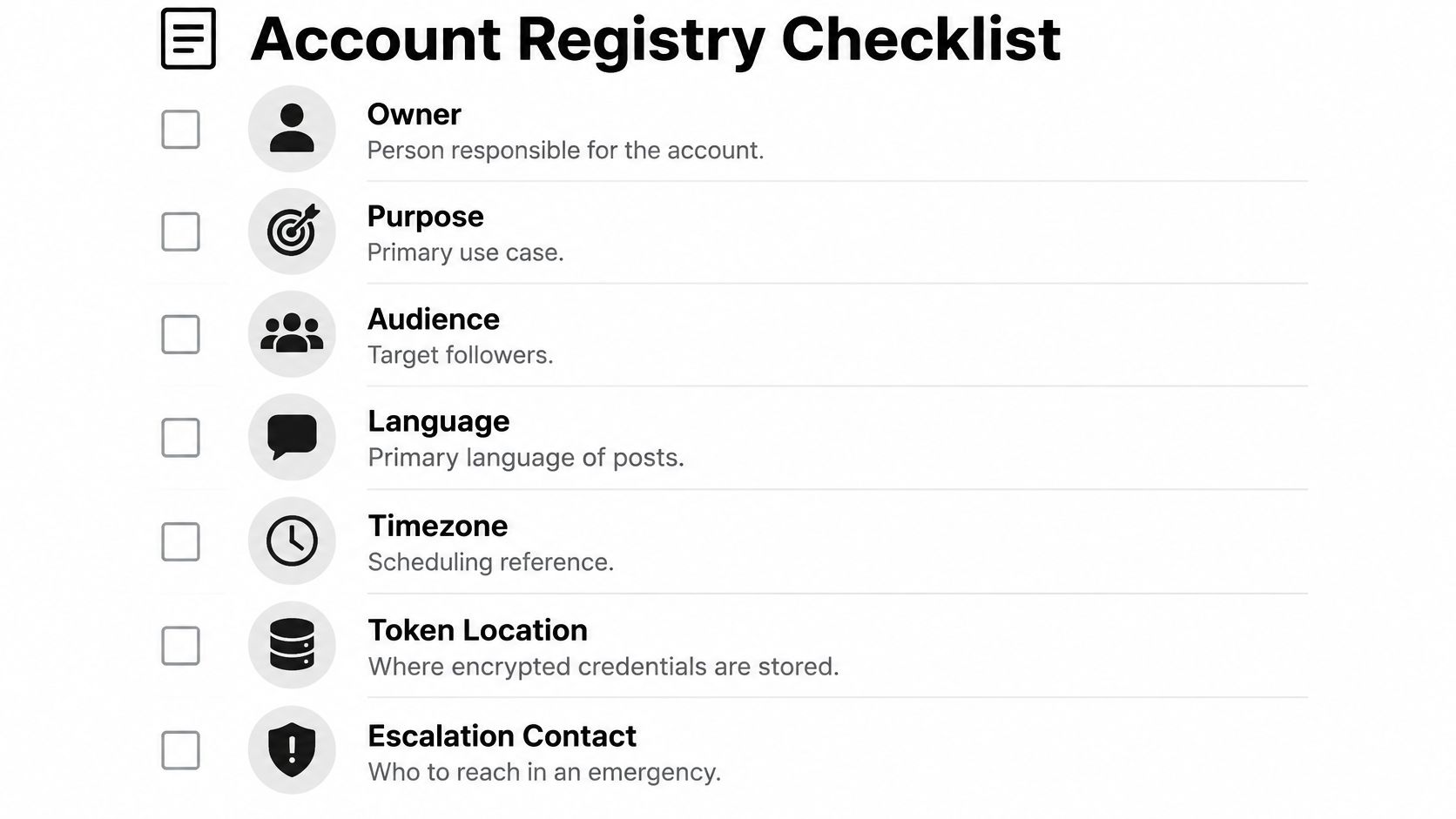
Use the checklist as your inventory, then add the editorial and connection details your team needs.
Make each row operational
| Registry field | What to record |
|---|---|
| Handle and owner | Exact account identity and accountable human |
| Purpose | The job this account exists to do |
| Audience and geography | Who should find its posts useful |
| Language and timezone | Editorial language and scheduling reference |
| Editorial brief | Voice, permitted topics, and exclusions |
| Token location | Reference to secure storage, never the token itself |
| Escalation contact | Who can make urgent publishing decisions |
| Connection status | Authorized tools and offboarding status |
Purpose is the deciding field. “Company account” is too vague. “Product education for existing customers, excluding individual support cases” gives an editor something usable.
For a hypothetical software business, the founder might explain product decisions while the brand publishes release information. The community handle should have its own participation role, rather than acting as spare distribution capacity. Write those distinctions before assigning content.
Account separation can reflect interests as well as professional roles. A Japanese survey described users dividing Twitter activity among entertainment, personal activities, and hobbies, though its findings shouldn't be generalized globally (Japanese survey on account ownership and usage purposes).
- Onboarding: Add the account before granting tool access.
- Ownership changes: Update the responsible person and escalation path together.
- Offboarding: Record the final handover and confirm that old connections have been removed.
The registry shouldn't become another place to store secrets. Its job is to show where authority lives and where approved credentials are managed.
Connecting Accounts the Safe and Reversible Way
A contractor finishes on Friday, and by Monday nobody is sure whether their login, the scheduler queue, or the client-owned token still has publish rights. That is the moment a sloppy connection method gets expensive.

Use official OAuth authorization for connected publishing tools. Treat the consent screen as an access review: check the active handle, read the permission scope, and confirm which workspace will receive the connection. If the screen shows a different account than the one in your registry, stop there.
My connection order stays fixed. The account owner approves access and knows the revocation path. I verify the handle twice, once on X's screen and once back inside the tool. Then I save a draft, confirm where it would publish, and only after that enable scheduled posting. The final step is administrative: record who owns the connection, where credentials live, and what must be paused if access ends.
For custom integrations, keep access and refresh tokens encrypted and separated by account. Do not reuse a client token across workspaces. Do not copy tokens into spreadsheets, tickets, chat threads, or publish logs. Operators need the account identity and its status, not the secret value.
When you compare services, start with the guide to third-party publishing tools, then still inspect the actual permission prompt before approving anything.
This video gives extra setup context; confirm the current authorization screens yourself.
A personal handle can live with native access if one person owns it end to end. Brand and client accounts need a connection that survives staffing changes, including the awkward ones.
Disconnecting is a handover task. Pause queued posts, revoke the OAuth grant, remove stored credentials, and check that retries or background jobs cannot publish afterward. Removing an account from a dashboard only counts after you confirm what that action revoked.
A Scheduling Workflow That Actually Scales
Start with an announcement brief, not a finished post you intend to duplicate. Capture the underlying news, approved claims, available assets, destination page, and audiences that need it.
Then make an editorial decision for each handle. A common campaign can support distinct posts, but a synonym swap doesn't create a new purpose.
Per-Account Content Variants for the Same Announcement
The following is a hypothetical product-release plan, not a reported campaign result.
| Account | Format | Hook angle | CTA | Hashtags |
|---|---|---|---|---|
| Founder | Thread | Why the team chose this approach | Discuss the trade-off | Relevant topic only, if useful |
| Brand | Image post | What customers can now do | Read the release details | Product-related, if appropriate |
| Community | Contextual reply | Answer an existing user question | Share the remaining problem | Usually unnecessary in a direct reply |
The community reply belongs only where it answers a real question. Don't manufacture a conversation between your own accounts to complete the campaign plan.
Build independent queues with explicit timezone labels. Review the account, local publication time, media, destination link, and approval state together. A portfolio calendar is useful for spotting collisions, but account-level views remain necessary for checking editorial continuity.
A reusable asset is useful. A reusable message still needs an editorial decision.
Use a media library for approved assets, with filenames that identify the campaign and version. Inspect crops and accompanying text for each destination instead of assuming the shared file fits every post.
For the wider planning process, Boocoo Brisbane marketing advice is a useful companion resource. For queue setup, the social media post scheduler guide provides additional context.
A practical Monday routine is review, adapt, queue, approve, publish. Review unfinished work before adding fresh drafts, and leave room for support issues or changed announcements.
Recurring posts and auto-reposts need an expiry condition and an owner. Don't enable them on X because a tool exposes the option. Recheck relevance and the platform's duplicate-content restrictions before anything returns to a queue.
Choosing Between Native Switching, Browser Profiles, and a Scheduler
The wrong choice here rarely fails loudly. It fails on a Friday evening, when a reply meant for a personal argument goes out under a client handle, or a queued post ships after the announcement it promotes got pulled. Pick the setup that matches how work moves through your hands, because account count alone won't tell you that.
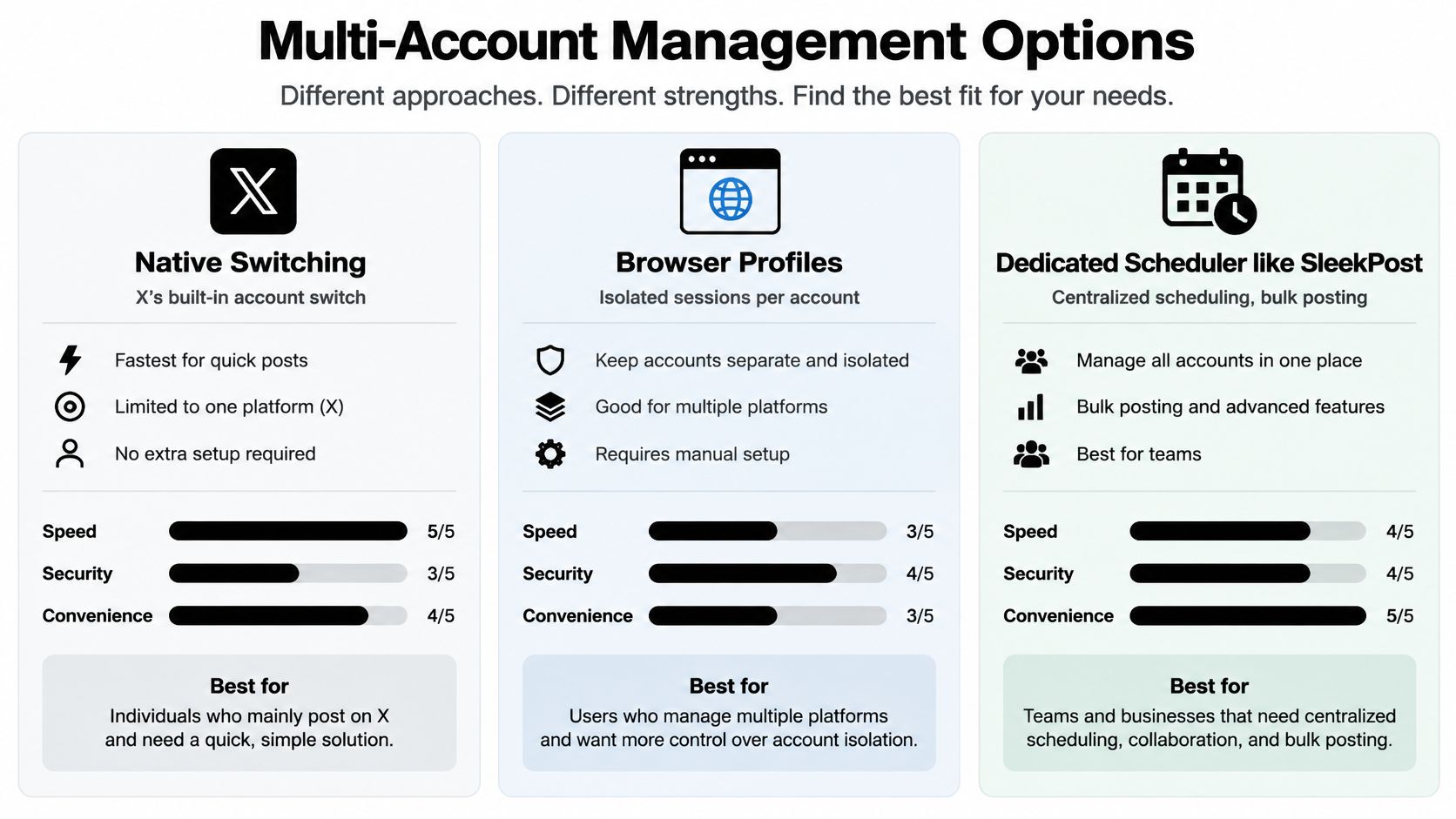
| Method | Where it earns its place | Main trade-off |
|---|---|---|
| Native switching | Direct posting and checking conversations | You must verify the active identity |
| Dedicated browser profiles | Manual work organized by client or brand | You still need a separate publishing process |
| Dedicated scheduler | Planned publishing across accounts | You must evaluate permissions, failures, and records |
Treat that table as a decision aid. No row in it substitutes for checking how each option behaves in your own environment.
Decide in this order.
- Count operators. One person handling everything, with activity that's mostly conversational, can stay on native switching. It keeps the work inside X, though it still doesn't replace an approval record, and the active handle needs checking before replies, not only before original posts.
- Count working contexts. A freelancer running distinct client environments gets real value from dedicated browser profiles. Name each profile after the client, set a visual theme, and keep that client's bookmarks and documents inside it. Two tabs in one profile share a single session, and a client task opened in whichever window happens to be free erases the boundary you built.
- Count handoffs and deadlines. The moment work has to move between people or wait for a future slot, a scheduler earns its subscription.
When a scheduler is the answer, test it against the failure modes that hurt. Does the composer label the destination account clearly? Can an operator draft without publishing? Can you trace author, approver, and final text on anything that went out? Does the queue surface failures, and can you halt pending work or detach a client cleanly without disturbing unrelated accounts? Verify granular permissions and approval routing in the current offering rather than assuming a named product includes them, and where those controls live outside the tool, document the external process.
Price is the visible part of this decision. The invisible part is reconciliation time, repeated identity checks, and handoffs nobody owns. Pay for the tool that removes that work while keeping responsibility in plain sight.
Access, Approvals, and the Security Layer Most Guides Skip
Three weeks after a contractor's last day, a client handle publishes a promotional reply nobody approved. The workspace invite was never revoked, the shared login still worked, and nobody could say whose device sent it. That failure is missing ownership, and the fix is structural.
Start with account-level basics. X recommends strong unique passwords, two-factor authentication, verified recovery details, and caution around suspicious links and third-party credential sharing (X's account security guidance). Then name the person who owns recovery email, authentication methods, and emergency access for every handle. One owner, written down.
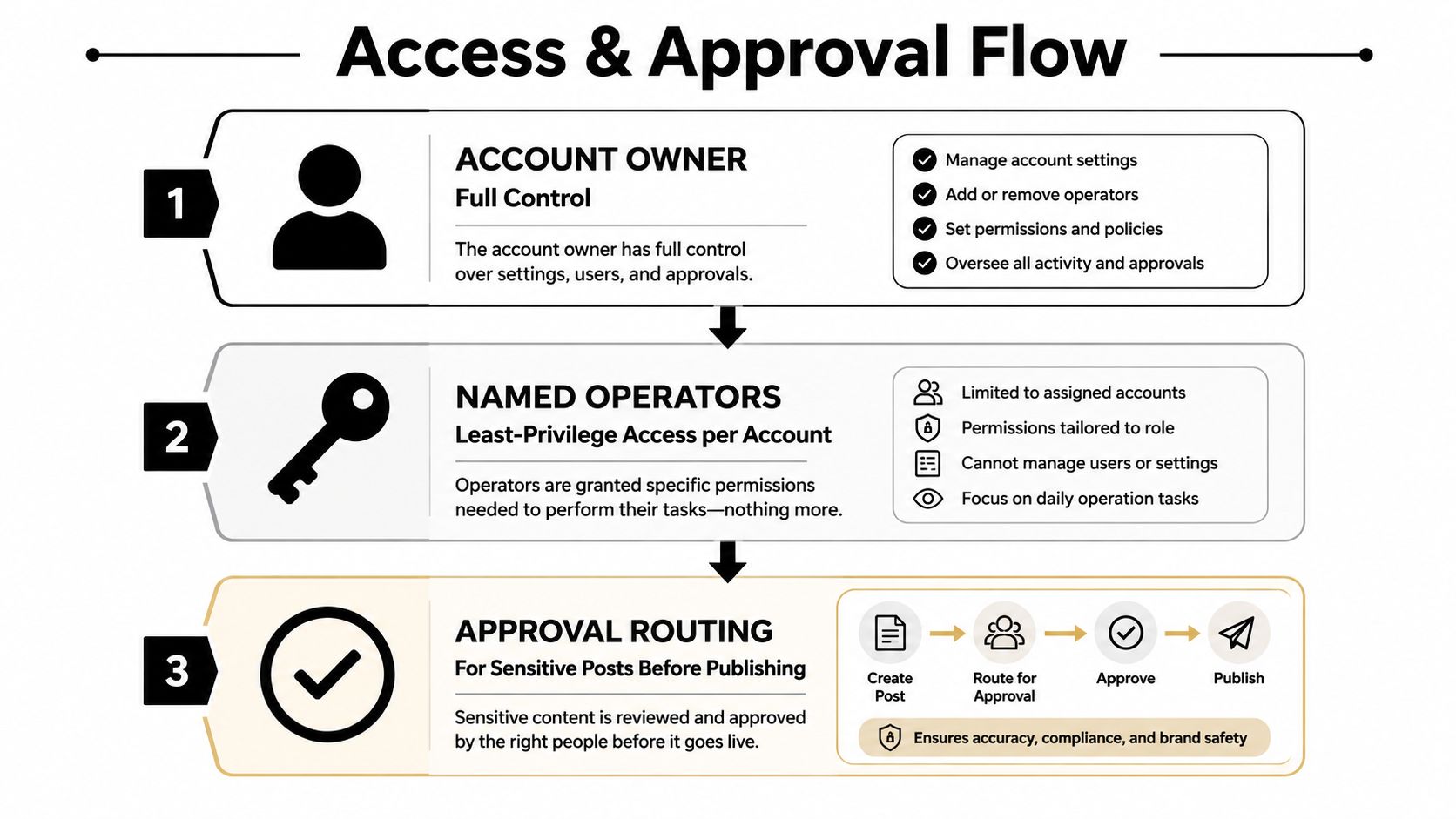
The access model that survives incidents separates four jobs. Named operators replace the generic team login, and each role gets a hard boundary.
| Role | Drafts | Approves | Publishes | Changes settings and recovery |
|---|---|---|---|---|
| Operator | Yes | |||
| Reviewer | Yes | Yes | ||
| Publisher | Yes | |||
| Account admin | Yes |
Where your tools can't split these cleanly, restrict direct publishing to one named person and keep a written approval record holding the exact approved text and media, rather than a chat message saying the campaign looked good. Any material edit after approval goes back through review. And sensitive work (politics, trending hashtags, legal statements, customer allegations, unverified product claims) routes to a designated reviewer instead of following the routine path.
Security test: If this operator's device were compromised, which accounts could someone publish to?
That question exposes the blast radius of your setup. Centralized publishing should shrink the answer, never hand every operator a portfolio-wide publish button.
Departures get the same rigor as onboarding. Revoke workspace access the day someone leaves, review connected third-party applications, and confirm custody of recovery methods. For incident-planning context, MY CYBER GUARD's resource on small business social media breach response covers an Instagram-focused scenario; treat it as adjacent planning material rather than X-specific recovery instructions.
The agency social media management tools guide can support your evaluation, but test access boundaries yourself before trusting them. A tidy dashboard proves nothing about whether unrelated clients are properly separated.
Staying Inside X's Rules When You Run a Portfolio
Running separate accounts is not permission to coordinate artificial engagement. X permits up to 10 accounts for different, non-duplicative purposes, while prohibiting coordinated inauthentic activity and duplicate or substantially similar automated posts across accounts (X's authenticity policy).
The operational distinction is intent and execution. A founder explaining a decision and a brand publishing customer instructions can serve different purposes. Arranging for controlled accounts to like, repost, follow, or engage with the same posts to manufacture visibility crosses a different line.
Review campaigns for substance, not cosmetic variation
Before approving cross-account work, ask:
- Distinct purpose: Does each post belong on that handle according to the registry?
- Distinct contribution: Does it offer something meaningfully different, rather than altered punctuation or synonyms?
- Audience relevance: Would this account publish the message if the other accounts didn't exist?
- Independent engagement: Are operators responding to genuine conversations rather than fulfilling an amplification plan?
- Human review: Has someone inspected the final account-specific posts together?
Staggering publication can improve pacing. It does not make prohibited duplication or manipulation acceptable. Neither different devices nor separate browser profiles change the underlying policy.
Technical limits need separate attention. X lists account-level ceilings of 2,400 posts, 500 direct messages, and 400 follows per day, with activity aggregating across access methods; these are ceilings, not recommended targets (X's account limits).
For a custom publishing system, use durable queues keyed by account and endpoint, conservative budgets, and idempotent publishing so retries don't create additional posts. On HTTP 429 responses, respect the reset information and apply backoff rather than retrying aggressively. Don't use browser automation, bulk following, or extra connections to work around restrictions.
Evaluate any plan to automate Twitter posts against both technical limits and editorial policy. Successful API requests don't prove that a campaign complies.
Run the system throughout the week
On Monday, reconcile the registry with active connections and review pending work. Adapt drafts and route sensitive content to its approver before scheduling.
During publication, check failures and confirm that published posts match their approved versions. Keep an audit record containing author, approver, timestamp, destination account, and final text.
On Friday, review connected applications, unresolved failures, stale recurring content, and upcoming ownership changes. This is a recommended operating cadence, not a platform requirement.
When something goes wrong, use a short, documented response:
- Wrong account published: Pause related queued work, preserve the post and approval record, then have the owner decide on removal or correction.
- Token compromised: Stop affected integrations, revoke the authorization, then investigate access and reconnect only after containment.
- Account suspended: Stop affected automation, preserve logs and notices, then have the owner review the stated reason and pursue the appropriate review process.
The useful outcome isn't a calendar full of posts. It's a portfolio where you can explain why each account published, who authorized it, and how you'll stop further activity when something looks wrong.
SleekPost offers centralized scheduling, account-specific copy and media customization, and queue-based publishing for managing multiple social accounts. Visit SleekPost to try that workflow with a clearly mapped account first, then check its fit against your approval, access, and audit requirements before expanding across your portfolio.