Your site won't load, a customer has messaged you about a failed checkout, and the person who owns the hosting account is offline. You open the provider's status page. Everything's operational. Then you find the renewal notice in an inbox nobody checks.
Downtime prevention starts with the dependencies your team can control: account access, renewals, changes, backups, and decisions under pressure. Before paying to duplicate servers, make sure someone besides the owner can renew the domain, restore the site, and tell customers what's happening.
Table of Contents
- Where Downtime Actually Comes From
- How to Set Up Monitoring and Alerts in an Afternoon
- Tools That Cover Each Layer Without Overspending
- Choosing Which Dependencies Get Redundancy First
- Backup and Scheduling Workflows for Social Posting
- Incident Response Runbooks and Postmortems That Work
- Start With This Prioritized Checklist This Week
Where Downtime Actually Comes From
An expired domain can make a healthy website unreachable. A rejected payment can suspend a tool your entire publishing workflow relies on. Neither problem requires a cloud failure, and buying another server won't fix either one.
For a small team, these administrative and procedural failures deserve attention before elaborate infrastructure upgrades. That's a prioritization judgment, not a claim that every small business has the same outage history. Start by checking what could interrupt your customer journey.
Use this cause checklist by scanning the symptom column, then checking whether the first safeguard exists. Severity ratings are rough prioritization guides, not measured findings. A local internet failure becomes much more serious if your business runs live broadcasts.
Common downtime causes for small teams
| Cause | Typical symptom | Typical severity | First safeguard |
|---|---|---|---|
| Expired domain or SSL certificate | Browser warning or site unreachable | High | Auto-renew plus staged expiry reminders |
| Hosting provider outage | Site and forms unreachable | High | External uptime checks and a static backup copy |
| Failed plugin or theme update | Blank page or broken checkout | Medium | Staging test and a rehearsed rollback |
| Expired card on a SaaS tool | Account suspended, tools stop working | Medium | Backup payment method where supported and card-expiry reminders |
| Locked account or lost 2FA device | Cannot log in to host, domain, or social accounts | High | Recovery codes stored securely outside the locked account |
| Social platform token expiry | Scheduled posts fail without warning | Medium | Queue review and reconnect alerts |
| Human error in a config change | Site or workflow broken after an edit | Medium | Backup before changes and a change log |
| Traffic spike or DDoS | Slow or unreachable site under load | Medium | CDN with appropriate rate limiting |
| Office power or internet loss | Local tools and uploads stop | Low | Cloud-based tools and a tested mobile hotspot |
Find the shared failure
The dangerous pattern is several services depending on one neglected account. Your domain, newsletter, store, and scheduler might all send billing notices to the same personal inbox. That creates a shared failure point even when each service has a different provider.
Review your third-party tools as a dependency map, not just a subscription list. Record the owner, billing contact, recovery route, and services that stop when each tool becomes unavailable.
Practical rule: Fix a missing renewal owner before buying redundancy that still depends on the same account.
Circle the causes that match your setup most closely. Those become your first prevention tasks, rather than whichever infrastructure upgrade looks most impressive.
How to Set Up Monitoring and Alerts in an Afternoon
You can build a useful monitoring baseline in an afternoon if you keep the scope tight. A setup nobody checks can be worse than none because the team assumes someone will receive an alert.
Monitor whether customers can complete important actions, not merely whether a server answers. Finchum Fixes IT's guide to proactive monitoring to prevent costly downtime is a useful companion when deciding how checks should lead to action.
Build the checks around customer actions
The workflow starts with an inventory and ends with a tested notification route.
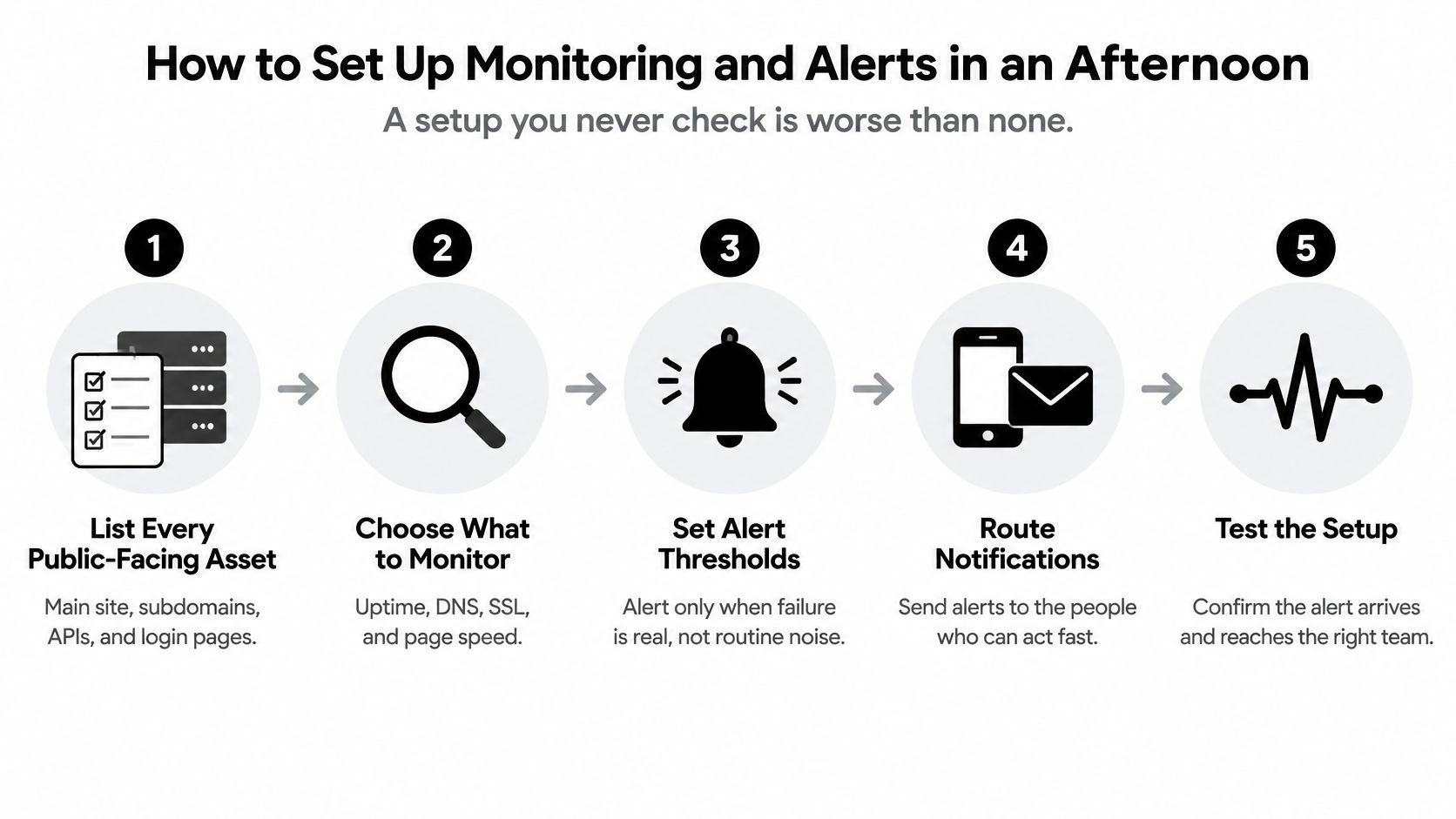
List the public-facing assets. Include the main site, checkout, booking form, newsletter signup, domain, and social accounts. Give each asset an owner and identify which checks require a login or platform-specific notification.
Add external uptime checks. I'd start with checks every minute for revenue-critical URLs and every few minutes for less urgent pages. Run them outside your own network so an office connection failure doesn't hide the problem.
Check page content. Add an expected keyword or element, such as the booking button. A successful HTTP response doesn't prove the page contains the working content customers need.
Set expiry reminders. A practical starting schedule is reminders a month, a fortnight, and a week before domain or certificate expiry. Check that auto-renew is enabled and that billing notices reach a shared operational inbox.
Add job heartbeats. Have backup jobs and publishing automations report successful completion to a heartbeat service. Alert on a missing completion signal, rather than accepting “the job started” as proof it worked.
Route alerts through independent channels. Use phone push plus email, with a named backup responder. Don't send every notification through the service you're monitoring.
Suppress transient noise. I'd require consecutive failed checks before paging someone, while keeping the check interval short enough for the business's response target. This filters brief network glitches without teaching people to ignore constant alarms.
Test the whole route. Break a harmless staging page deliberately and confirm the notification reaches both responders. Measure the delay and adjust the interval or threshold if the alert arrives too late.
Keep the dashboard actionable
Your dashboard should show the affected asset, last successful check, current owner, and recovery instructions. Keep engagement metrics separate from availability checks, even if you also track content performance.
A green dashboard is useful only when the checks represent real customer actions. Review failed-check history and remove alerts that nobody can act on.
Tools That Cover Each Layer Without Overspending
Choose one tool per operational layer before adding overlapping products. Paying for multiple dashboards doesn't improve resilience if they all send the same notification to the same unattended inbox.
Evaluate the gap each tool closes and the work it leaves to your team. A backup utility copies files, for example, but it doesn't decide whether the database and uploaded media represent a consistent recovery point.
Tool options by downtime layer
| Layer | Example tools | What it covers | Cost |
|---|---|---|---|
| Uptime and SSL checks | UptimeRobot, Better Stack | External HTTP checks; keyword and SSL features require plan review. Doesn't repair failures | Check current free-tier limits and paid alerting options |
| Scheduled job heartbeats | Healthchecks.io | Missing signals from backups or cron jobs. Doesn't validate backup contents | Check current free-tier limits |
| Shared recovery and credentials | Bitwarden, 1Password | Shared access and recovery information. Doesn't guarantee provider recovery approval | Check shared-vault and business-plan requirements |
| Off-site file backup | rclone with Backblaze B2 or Google Drive | Copies media and exports. Doesn't automatically create application-consistent backups | Storage, transfer, and account charges may apply |
| Customer status page | Instatus, Statuspage | Public incident updates. Doesn't restore the affected service | Check subscriber and notification limits |
| Multi-platform post scheduling | A multi-platform scheduler | Central queues and publishing workflows. Doesn't monitor website availability | Check trial terms and paid-plan features |
Buy the missing capability
A limited monitoring plan can be enough when it covers your critical URLs, required intervals, and notification routes. Upgrade when a specific limit blocks the response you need, not because the paid dashboard looks more complete.
Shared credentials deserve particular scrutiny. Personal password storage isn't the same as a team vault with controlled access, and a recovery code stored behind the account it grants access to isn't a dependable recovery route.
For publishing tools, compare social media management software on queue visibility, failed-post handling, exports, and account reconnection. A scheduler belongs in the publishing layer, not the uptime-monitoring layer.
If a tool neither alerts someone nor helps restore a service, it isn't part of your downtime defense. A status page supports the response, but don't mistake it for prevention.
Check current pricing and limits before committing. Tool features change, and unused subscriptions still require billing ownership and access management.
Choosing Which Dependencies Get Redundancy First
Duplicating your entire stack is rarely the best first purchase for a small team. Every duplicated component brings synchronization, deployment, testing, and failover work, and someone has to maintain all of it. Meanwhile, the outages that take small operators offline are usually an expired domain, a locked account, or a card that failed on renewal.
Infrastructure redundancy still earns its place. Uptime Institute's outage analysis associates applications spread across regions with substantially lower downtime. That finding doesn't tell a creator or small shop which dependency deserves the next dollar.
Start the design discussion with access and revenue, rather than server count.

Rank consequences before architecture
Use low, medium, and high ratings for these criteria. Write down the reason for each rating so the score reflects an actual business consequence.
- Revenue exposure: Does failure stop purchases immediately, delay future sales, or merely inconvenience staff?
- Recovery tolerance: How long can the business operate without this dependency, and how much information can it afford to lose?
- Customer concentration: Would a regional or channel-specific failure affect most customers, or leave a usable alternative?
- Vendor lock-in: Can you export information and switch providers, or would migration require rebuilding the workflow?
A practical starting order is identity and email, then domain and DNS, payments, publishing, and backups. Change that order the moment your scoring exposes a different immediate risk.
For identity, redundancy means tested alternate-admin access and recovery codes stored outside the account itself. A second mailbox nobody has permission to use is not redundancy. For domain and DNS, it means accessible registration records and a documented recovery route, since you cannot register the same domain twice.
Payment alternatives should be approved and ready to use, such as an established invoicing route. Publishing needs a usable alternate channel. Backups need separation from the account or provider whose failure they're meant to survive.
Use architecture guidance only after identifying which business function must remain available.
Remove the cheapest shared failure
Say a creator's newsletter, store, and social accounts all depend on a personal email account. Losing access blocks password resets across the business.
An independently recoverable backup administrator can reduce that exposure without duplicating the store or newsletter system. Confirm the person has actual permissions and can authenticate without the unavailable owner.
Reserve full duplication for dependencies rated high across multiple criteria. Even then, fund a failover test alongside the duplicate system. An untested standby is an expense, not demonstrated resilience.
Backup and Scheduling Workflows for Social Posting
The website comes back, but the publishing calendar doesn't. Captions lived in the scheduler, edited videos remained on a laptop, and nobody exported the queued posts.
Website recovery and publishing recovery are separate jobs. Protect the information needed to resume work, not merely the application that displayed it.
The schedule below is a practical starting policy, not a universal requirement. Increase backup frequency when losing the changes since the previous copy would be unacceptable.
Backup and restore checks by asset
| Asset | Backup frequency | Off-site location | Restore test |
|---|---|---|---|
| Website files and database | Daily, with a weekly full copy | Separate provider from the host | Restore to staging monthly |
| Domain and DNS records | After every change | Secure vault note and independently accessible document | Compare with current records quarterly |
| Social post queue and captions | Weekly export to CSV or supported format | Spreadsheet outside the scheduler | Re-import a test post monthly where supported |
| Media library | After each content batch | Off-site storage bucket | Open sample images and videos monthly |
| Account recovery codes | On creation and after replacement | Password manager plus printed copy in a safe | Test an authorized recovery path quarterly |
| Email subscriber list | Weekly export | Restricted, encrypted second storage location | Import into an isolated test list quarterly |
Make the publishing backup usable
Preserve more than the caption. Include intended platform, publication date, timezone, media filename, destination link, approval status, and any platform-specific edits.
An export isn't useful if the replacement tool can't interpret it. When choosing a social media post scheduler, check the supported export and import workflow before relying on it for recovery.
If direct export isn't available, maintain an independent editorial sheet and retain the original media. Don't assume that a scheduler's internal queue can be reconstructed from published posts.
Prepare a manual fallback
Keep a holding set of approved evergreen posts that doesn't depend on a particular launch or promotion. Name a fallback channel for important announcements, such as a separately hosted status page or an accessible email service.
A token-expiry instruction can be short: Pause retries, verify native account access, publish the approved item manually, record its publication, then reconnect the integration. Recording the manual publication prevents a duplicate when queued jobs resume.
Restore standard: The person testing the backup should be able to use it without asking the original author where the missing files are.
Protect subscriber exports as sensitive information, and prevent test imports from triggering live campaigns. After using a single-use recovery code, replace or update the stored copy as the provider requires.
Assign every restore test an owner and a calendar date. “We should test backups” isn't an operational task until someone knows when it's due.
Incident Response Runbooks and Postmortems That Work
The only administrator is on a plane. Someone wants to change DNS, someone else is restarting services, and promotional posts continue directing customers to a broken checkout.
That's a decision problem before it's a technical one. A small team needs clear authority, safe access, and a shared sequence of actions.
Uptime Institute's 2025 annual outage analysis reported that nearly 40% of organizations experienced a major human-error outage during the preceding three years. You can't eliminate mistakes, but you can remove the uncertainty that encourages rushed, conflicting fixes.
Write the page people can use under pressure
Keep the runbook accessible outside the affected system. Store sensitive credentials in the vault, with the runbook pointing authorized responders to the correct entry.
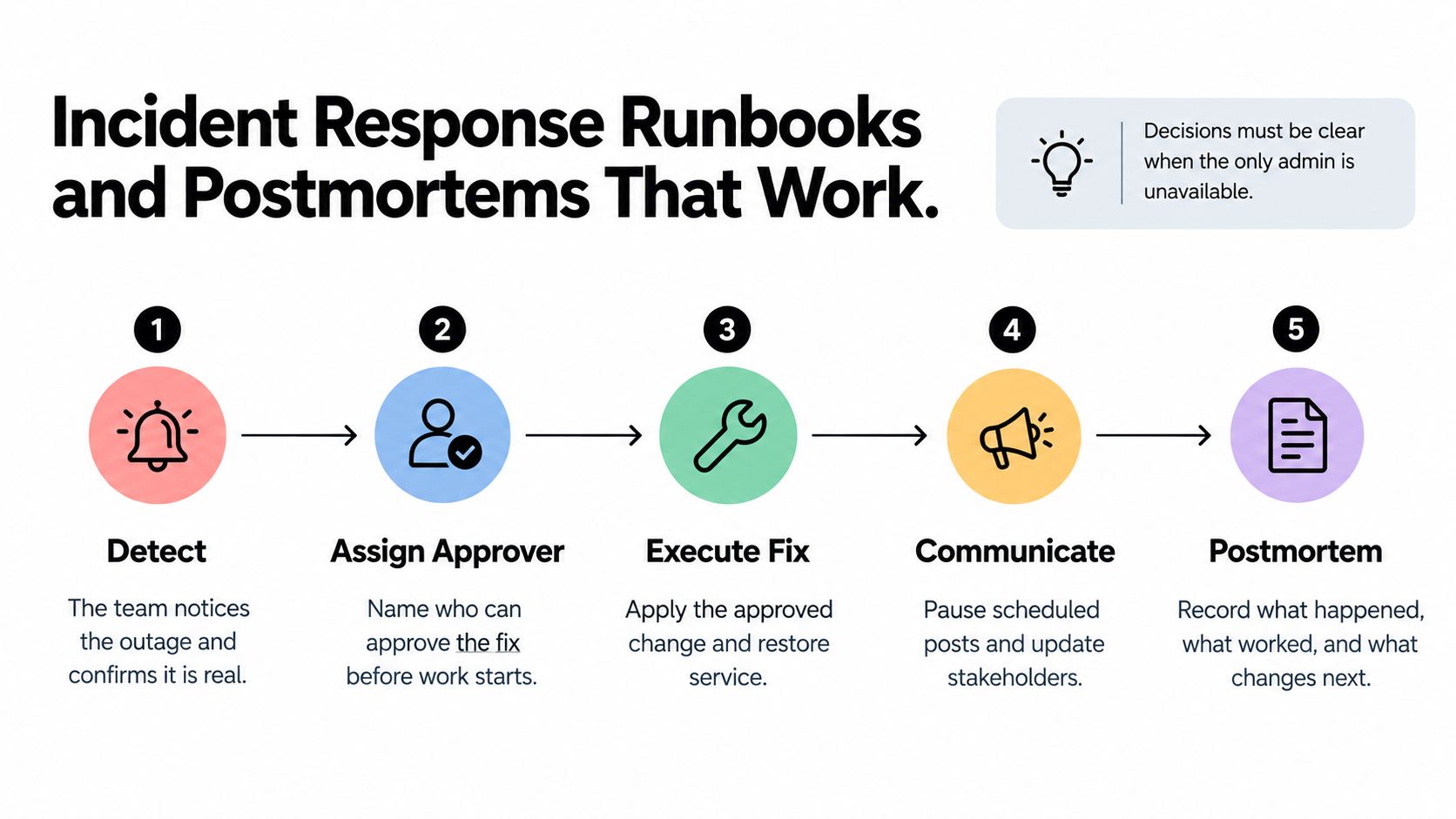
Name the decision-makers. Identify who can declare an incident, who approves risky changes, and who substitutes for each person. Give the backup explicit authority before an outage occurs.
Define severity through customer impact. Treat unavailable checkout, inaccessible administration, and delayed publishing differently. Set your own time thresholds, but escalate immediately when there's suspected compromise or a risk of destructive data loss.
Specify the opening actions. Confirm the failure externally, inspect provider status, identify recent changes, pause inappropriate scheduled posts, and freeze unrelated deployments. Capture the starting state before changing it.
Prepare a customer update. Use a template containing the affected service, customer impact, available workaround, and next update time. Don't promise restoration until you have a defensible estimate.
Verify alternate access. Name the backup administrator and the required vault entry. Ensure their authentication doesn't depend on the missing owner's phone.
Define the escalation trigger. Record the paid support route, account identifier, and circumstances that justify using it. Don't make a responder search invoices to discover whether urgent support exists.
Schedule the postmortem. Hold it promptly after service stabilizes, while decisions and timestamps remain clear. Assign an owner and due date to each corrective action.
The response sequence should remain recognizable even when the technical fix changes.
Fix the process, not the person
A useful postmortem separates the initiating event from the conditions that allowed it to become an outage. “Someone applied the wrong setting” leaves out whether review, rollback instructions, permissions, or staging checks were missing.
Apply clear reporting practices: distinguish confirmed facts from assumptions, preserve a timeline, and connect recommendations to observed failures. Replace “be more careful” with a concrete change, such as requiring approval for production edits.
Rehearse the runbook with a fake outage and an unavailable owner. Ask the backup responder to locate access, approve a rollback, and draft the customer message. Every place they hesitate is a documentation or permission gap worth fixing.
Start With This Prioritized Checklist This Week
Don't turn downtime prevention into a migration project before closing the obvious gaps. Assign each task an owner, attach evidence of completion, and choose work that removes an immediate obstacle to detection or recovery.
Use these time horizons as a working schedule. The section references identify the instructions to use when carrying out each task.
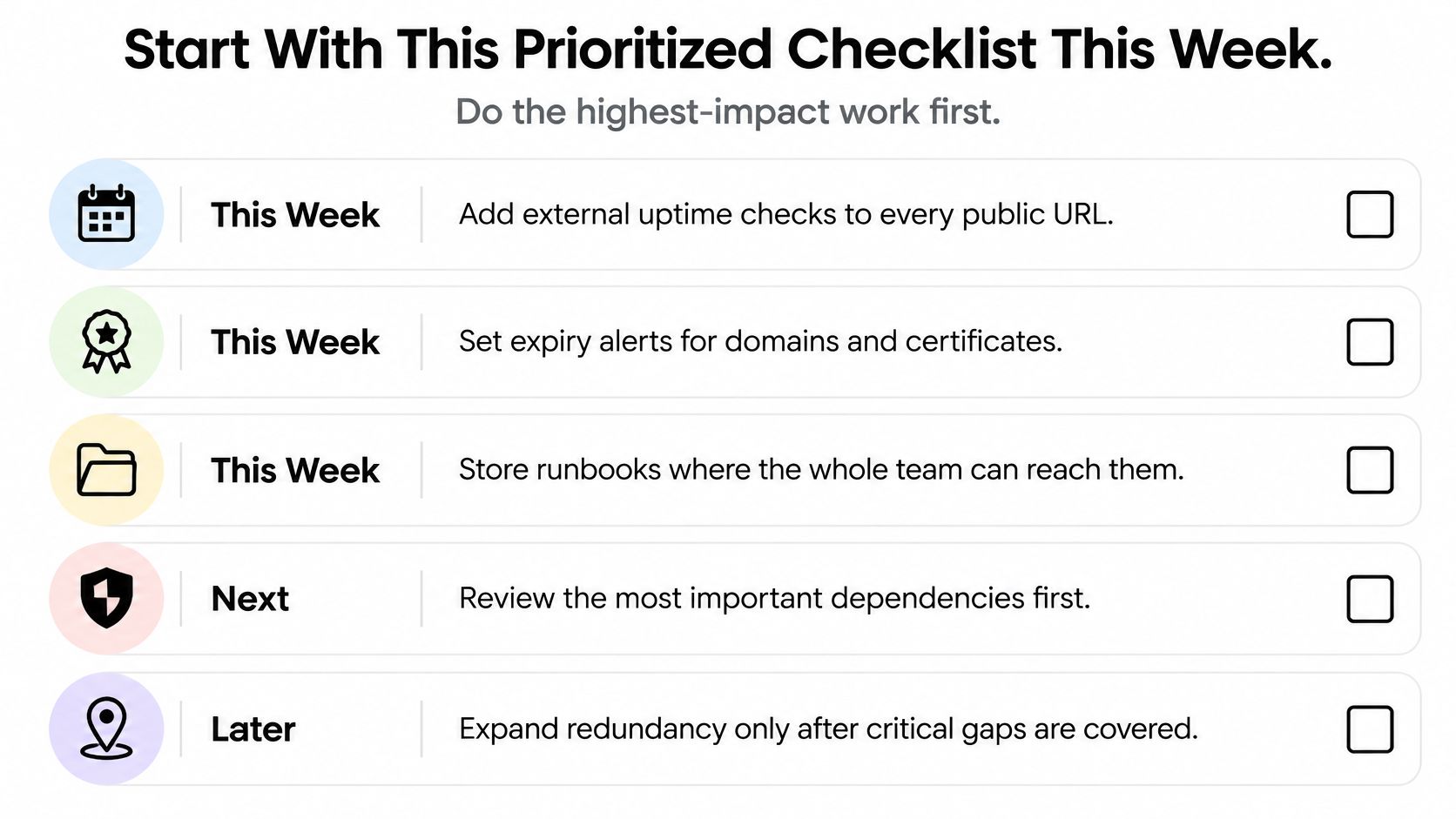
This Week
- Monitor public assets: Add external checks and expiry reminders using How to Set Up Monitoring and Alerts in an Afternoon. Save evidence that a test notification arrived.
- Secure recovery access: Store recovery material and authorize an independently recoverable backup administrator using Choosing Which Dependencies Get Redundancy First.
- Protect the queue: Export current publishing information using Backup and Scheduling Workflows for Social Posting. Open the saved file before marking the task complete.
This Month
- Watch unattended jobs: Add completion heartbeats for backups and scheduled workflows using the monitoring instructions.
- Write the response page: Assign approval authority, escalation routes, and communication responsibilities using Incident Response Runbooks and Postmortems That Work.
- Prove recovery: Complete a staging website restore and a media-library check using the backup inventory.
- Prepare fallback publishing: Approve evergreen content and confirm who can publish important announcements through the alternate channel.
This Quarter
- Reassess spending: Review dependency ratings and fund the highest-consequence gaps using Choosing Which Dependencies Get Redundancy First.
- Run a tabletop drill: Walk through an outage without the primary administrator, then update the runbook with the missing permissions and decisions.
- Review tool overlap: Use Tools That Cover Each Layer Without Overspending to remove duplicate coverage without deleting a necessary recovery route.
If publishing is your weakest dependency, test a scheduler's recovery workflow before committing to a paid plan. Confirm what can be exported, what can be re-imported, and what you'd need to publish manually.
Pick one item to finish today. A good starting point is sending a test alert to your backup responder and confirming they know what to do next.
SleekPost brings multi-platform scheduling, recurring posts, and auto-reposts into a single dashboard, making your publishing queue easier to manage alongside a documented fallback routine. Visit SleekPost to try the workflow, then check how you'll preserve captions and media before making it part of your downtime prevention plan.